TV Shows OnDemandLine

December 18th, 2006

dailymotion.png

Today’s interesting find is called Daily Motion, which I found through a link at one of my favorite sites, DunderBall. The site is similar to YouTube in both intention and function, but lacks the sheer amount of users and videos. Although I love YouTube, Daily Motion offers something that YouTube doesn’t, and chances are, never will – Full TV Show Episodes.

While I’m pretty sure of the illegality of putting up entire episodes of TV shows online, I plan on enjoying this site as much as possible while it lasts.

The site is quite speedy and offers a full screen (window) mode that lets you watch full episodes of almost any TV show (and almost every episode of popular shows). I wanted to see what the show Sleeper Cell was all about, and have spent the last two hours watching the first two episodes (granted, with subtitles in French, but who cares!).

Its really easy to use so check out Daily Motion if you want to know what a show is all about. I’m going back to watching Sleeper Cell. Enjoy!


Take a Stand

November 23rd, 2006

standpoint.png

I was going to write one of those cheesy here’s what I’m thankful for this Thanksgiving, but geekify it a bit and write about what techy things I’m thankful for. But I’m not going to.

Instead, I think I’ll be thankful for free speech, with a little web 2.0 goodness mixed in. I’m talking about Standpoint, a website that allows you express your beliefs in a number of different ways.

You can state whether or not you agree with a variety of beliefs that other have submitted, or you could also submit your own custom beliefs, and people can comment, agree, disagree with what you said.

Its a pretty interesting concept, with the beliefs ranging from “Morality is not strictly religious- many atheists have very exacting moralities” to “Firefox is better than Internet Explorer” to “Ninja pirates are superior to everything.”

I think this site is perfect for days like today, when you’ve got nothing to do, and want to learn something / argue with someone / be heard / etc. Either way, check out the Standpoint, you might just like it. Happy Thanksgiving.

Maps For More Than Directions

November 15th, 2006

gmaps.png

If you’re anything like me, you only use map sites to get directions to take you from one place to another. Don’t get me wrong, they are amazing for that, but there’s SO much more.

My absolute favorite mapping site is Google Maps however, purely because its just so intuitive (nevermind good-looking). If I want to see a bit to the right of the current view on the map window, I just drag the map within the window. No page reloading, no nothing. It’ll even give you traffic on your cell phone! Its brilliant.

However, Google Maps are even more brilliant than that. You see Google allows application developers to use their maps for other purposes. You can find out where the cheapest gas is near you. You can find out where there are housing listings on Craigslist. You can create a map of your Facebook friends. You can even complain about that one red light that never turns green!

There are tons of different applications for Google Maps, so check them out!

My GreaseMonkey is My (Web) Co-Pilot

November 6th, 2006

GreaseMonkey

I browse a lot of websites. I’ll admit it. Sometimes I find that there is one simple way to improve a website – one minimal change – that could make it so much better. A button here, a link there. Luckily, this is where my love for Firefox Extensions comes in – the GreaseMonkey extension allows you to change pretty much anything about a website’s look, feel, or function through user scripts.

Its best illustrated with an example. I am an avid Gmail user, and find the email service very functional and simple. However, I don’t understand why they didn’t include a Mark As Read button for the inbox. It’s just asking to be there, but its not. Here’s where GreaseMonkey comes in – once GreaseMonkey is installed, I simply look for a Gmail Mark As Read Button script at Userscripts.com, a site devoted to collecting GreaseMonkey scripts.

Here’s a list of GreaseMonkey scripts that I have installed currently:

  • Google
    • Gmail Signature Float – Floats your signature above replied/forwarded message instead of below (default)
  • Facebook
    • Facebook Autologin v2 – no more having to press login despite having your login information saved
    • inYOfacebook – allows you to see people’s enlarged profile picture in search queries (very cool)
    • Facebook EZ Poke – no more poke confirmation page – it all happens with the click of the EZ Poke button
  • Last.fm
    • Chart Changes – Places a +/- value next to songs, artists, or albums tracking week to week changes
    • Artist Fan Rank – lets you know when people are in the top fan ranks for artists, songs, or albums
  • General

The vast majority of those scripts came from Userscripts.com, which has a large collection GreaseMonkey scripts you can search through. Its a great resource, and the key to adding website functionality that you have always wanted. There is also a variety of sites that have discussed the best GreaseMonkey scripts out there.

My suggestion is to install GreaseMonkey, check out the scripts that I use and see if they are beneficial to you, and then search for the sites you visit on Userscripts.com. GreaseMonkey can be an amazing asset, and its quite easy to use to boot! Enjoy!

Keep Your Contacts, Easily

November 3rd, 2006

Plaxo

Between high school, college, graduate school, work, and, well life in general – you’re bound to meet a lot of people. Business cards get lost, emails get changed, phone numbers come and go, and screen names get forgotten. Not anymore.

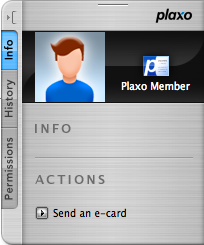
Plaxo is a company started in 2001, devoted to keeping people’s contact information current, and in the hands of people you think should have it. In addition to Address Book integration (on OSX), and Outlook integration (on Outlook), it has a really nice website that is quite easy to use. Other features include mobile phone integration and Gmail contact import. Plaxo is great for the business world, as well as just keeping in contact with your friends. It allows you to send out your updated contact information to all of your contacts, as well as request them to confirm the contact information you have for them.

Plaxo

You might say well I keep my contact information updated through sites like Facebook, etc. Facebook used to contain a feature that allowed you to download your friend’s contact information into the vCard format. Now that’s all gone. Plaxo is now the best way to keep your contact information up to date.

The first thing I thought of when I first heard of this site was privacy issues – are they going to share my information with anyone? Rest assured, Plaxo upholds a strict privacy policy and is completely secure to hold your contact information. Currently it has 15 Million+ members, and its growing significantly every day.

I highly recommend you guys check Plaxo out, and add me as a contact (eugene AT gordin DOT net).

iLike Music

October 26th, 2006

ilike.png

Today’s interesting find is iLike.com, a music social networking website devoted to helping you find new music. I realize that if you read Mike Went West at all, you remember my VolumeSessions post about last.fm, a site that is devoted to finding new music, but iLike.com has several distinct advantages over last.fm, despite the fact that iLike.com is still in its infancy: it went public on October 25, 2006.

iLike.com provides a sidebar attached to you iTunes window, which currently provides recommendations based on what you’re listening to (both song clips and full songs of free mp3s), tells you what your friends are listening to, and lets you access your iLike.com profile. The iLike iTunes sidebar hides either into a compact tab accessible at any time, or it can hide completely and run in the background. This is exactly the type of application transparency that is missing in the official last.fm player – the sidebar is non-obtrusive, well designed, and hide-able.

The site is also extremely well designed (and in Web 2.0 fashion), and allows you to connect to users based on your iTunes library, playcounts, and overall musical preferences. Since the site is just starting, its features are being implemented almost daily, and though the site is quite functional and interesting currently, there’s a whole lot of features on the way. My plan currently is to continue using iScrobbler for Last.fm and the iLike sidebar in the backgroun until iLike grows in both userbase and features, and then switch over.

Very cool interface, very cool site. Check it out, create an account, and be sure to add EGordin as a friend :).

The Sophisticates

September 20th, 2006

I’m not sure if I’ve blogged about this before, but once a month I get to contribute to one of my favorite blogs out there, Mike Went West. My monthly contribution is called VolumeSessions, where I am to intertwine the worlds of music and technology.

This month’s VolumeSessions is about Smart Playlists in iTunes – what they are, how to use them, how they can change your life, etc. Check out the post and check out Mike’s site in general – he knows what he’s talking about.

Oh and why is this post called The Sophisticates? You’ll just have to read the post ;) Enjoy.

Let Information Come To You

September 20th, 2006

rssfeed.png

As I’m sure you guys probably know by now, I read a large variety of websites on a daily basis, scouring the web for all that is new and interesting. However, of this large variety, I used to frequent the same 30 websites everyday, jumping from site to site after reading the new articles, and then checking back throughout the day for changes. This process was extremely inefficient.

Enter RSS feeds. RSS stands for Really Simple Syndication, and RSS can completely change how you browse the internet. Basically, RSS technology allows websites to offer feeds, or a up-to-the-minute list of articles, that people can subscribe to. Each time someone posts something on an RSS-enabled website, that article is added to the website’s RSS feed, and a notification is sent out to any subscribers.The beauty of RSS is that the notification doesn’t merely say that something on the website has changed – the notification is the headline and a portion (if not all) of the article itself. These RSS notifications can be gathered from almost all of the websites by any number of RSS Readers (or aggregators).

Some RSS readers are browser based, some are web-based, and some are program based. Below are some you can check out:

Web Based:

Browser Based:

Program Based:

OSX

Windows

Personally, I use Google Reader and I love the simplicity, labels, Google Account integration so I highly recommend that one, though there are other very good RSS readers out there. In fact, you can see all of my subscriptions by subscribing to this link, or sign up for Google Reader here.As time passes, more and more websites add RSS feeds – news sites, fashion sites, technology sites, law sites, music sites, library sites, and blogs (of course), pretty much all major sites have feeds that you can subscribe to. Any site that you see has icon above somewhere on it, has an RSS feed you can subscribe to. You can even have your RSS News feeds come to you in a newspaper format!RSS is a very efficient way to browse the web, and I highly recommend you take advantage of it.

Incidentally, if you want notification every time I have a new interesting find, subscribe to this link ;) . Happy Browsing!

An Update That Updates

August 25th, 2006

adblockplus.png

First of all, I’m back from Europe now, and I guess from Southern California too, so I should be posting regularly again.

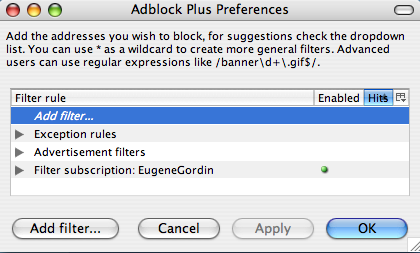
A couple of months ago, I wrote about absolutely must have Firefox Extensions, including Adblock. Well, little did I know but development for the adblock extension stopped a long time ago update: has split between a number of different authors, and now a better version was available: Adblock Plus. It has tons of bug fixes and added features, of which my favorite is subscriptions (note: as KNK points out, there area few different choices when it comes to Adblock, I however use Adblock Plus).

Basically, instead of importing a list and then slowly shaping it to fit all of the sites that you visit, you can subscribe to a list that someone already has and keeps updated. This way, everytime that person updates their filters, you automatically get the updates too. Very cool stuff and I have my list up for all of you to subscribe to if you’re interested. You can find it here (for a direct link, see my post in the comments).
I cannot stress how much better the internet is with adblock plus (and firefox for that matter), so I highly suggest you guys check it out.

The Initial Transformation: Part III

July 13th, 2006

I’m back with the third and final installment of my series on essential software for all new computers. While the first and second parts of this series covered the basic necessities, this third part will cover software that is just good to have around (for both Macs and PCs). Lets start with software for OSX, and finish with a couple PCs applications.

For OSX:

Internet Telephone skype_logo.png Skype: Skype allows you to speak to anyone in the world with a computer and an internet connection for free. You can also currently make free calls to any telephone number in the US, and make international calls for fixed minute rates. Video chat is also available.
Application Launcher quicksilver.jpg Quicksilver: An application launcher, Quicksilver can speed up drastically everyday tasks by allowing you to do a variety of things with simple keystrokes.
Space Saver quicksilver.jpg Monolingual: Monolingual is a must have application for all users that are, well, monolingual. Basically this program allows you to remove all of the unneeded language files except the one you need. It can save you up to 3GB of space!
Notifications growl.png Growl: Growl is a notification system for OSX that can alert you about anything from instant messages, to finished FTP tasks, to a new song playing in iTunes, all with a beautiful customizable interface.

For PCs:

Archiver
WinRar: WinRar is a replacement for windows compressed folder handling. It allows you to both create and extract all kinds of compressed filetypes.
iTunes quicksilver.jpg iTunes: There’s really no good reason to recommend iTunes except that its probably the best music player out there for windows. Also, I really like it because it gives Windows users a look into the simplicity that is Mac OSX.

Well that pretty much wraps up this series. I hope that it helped and if you know of any software that I missed, please let me know in the comments section and I’ll add it.

my writing

my website is a collection of my work and writing since 2004, so please don't be surprised if things seem a little outdated, particularly in the technology section. That said, the concepts behind most posts should be interesting given all that's happened since they were written so enjoy!