
Dictionary Tricks

May 29th, 2008

dictionary.png

I’ve been meaning to post these little Apple dictionary tips and tricks for a while now, but now finally have the time to do it. They come from a few TUAW and Lifehacker posts that I found particularly helpful. Dictionary.app is a built-in dictionary, thesaurus, and wikipedia (in Leopard) application that provides spellcheck and grammar throughout OSX.

Therefore, In most OSX applications, you can highlight a word, right (or two-finger-, ctrl-) click and go to “Look up in Dictionary.” This is very useful when you’re tired of deciphering enigmatic diction.

But, there’s a better way to get to the dictionary. In any native Cocoa application (most OSX apps), just highlight a word and then press CMD+CRTL+D. A little dialogue box opens up with the definition, synonyms, etc. Very cool.

The final little dictionary trick has little to do with the dictionary itself as much as it does with looking up words. If you come across a word (or phrase) in a document, pdf, or anything else that you’d like to Google, simply highlight the word and drag it to the Safari icon in the dock. Safari will the immediately open a new tab with a google search for whatever word or words you dragged.

Simple and effective. Enjoy.
Coverflow for Quicksilver

May 7th, 2008

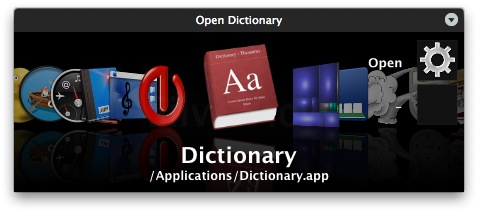
silverflow.pngJust a quick post today about something I’ve been patiently waiting to be released: Silverflow Interface for Quicksilver.

I’ve written about Quicksilver before, and now that its open-source I still highly recommend it. However, for those looking for a little more dazzle for their Quicksilver interface can download Silverflow, a coverflow-type interface.

Julius Eckert has more than a handful of very good looking QS interfaces, but Silverflow is now in open beta and I recommend those that don’t mind little beta bugs to try it out. Its a beautiful thing.

[Quick note: to install Silverflow, simply double click on the .tgz file that you get from Julius’ site, and then double click on the Silverflow.qsplugin that gets extracted. Then, fire up Quicksilver and press cmd+(comma) to see the Quicksilver preferences. In the Preferences section, click on Appearance in the column on the left, and then under Command Interface select Silverflow. All done!]

my writing

my website is a collection of my work and writing since 2004, so please don't be surprised if things seem a little outdated, particularly in the technology section. That said, the concepts behind most posts should be interesting given all that's happened since they were written so enjoy!