Moving Pictures

October 31st, 2006

gickr.png

Have you ever wanted to combine two of your photographs, or images, or pictures into one? Now there’s a really simple way to created animated pictures from up to 10 of your images - Gickr.com

The site lets you combine any two of your images into an animated GIF, quickly and easily (and lets you determine the speed of the animation). Its a pretty useful tool, even though it tags the upper left corner of your image with gickr.com. The site is pretty well done too, with a simple user interface and nice clean graphics.
Check it out!

dance.gif

PS If you want an example, here’s one I just made from two pictures my senior year in high school. I don’t have any idea why I would make any of those motions, but entertaining nonetheless. Enjoy.

PPS Yes, I used Gickr for the image for my post about iLike too. :)

A New Look!

October 31st, 2006

Welcome!

As you can tell, interesting finds has a new fresh look. I’ve been wanting to upgrade the site’s look for a while now, and I finally finished.

You will see little updates here and there in the coming weeks, but the overall design is now finished. I tried to go for a more clean look, adopting a two column structure to help you navigate the site quicker and easier.

I would love to get some feedback, so be sure and fill out the poll on the right, and if you have any questions/comments/suggestions leave them in the comments!

Thats all for now - enjoy!

Faster FireFox 2.0 (For Mac)

October 29th, 2006

firefoxbuild.png

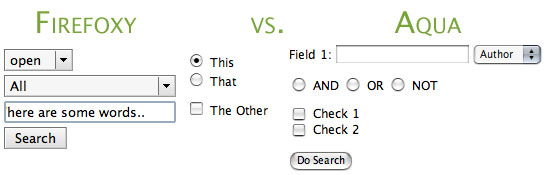
Firefox is quite a universal application (no pun intended). With limited exceptions, it can be run on Windows or OSX, regardless of Intel or Power PC processors. However, Firefox for OSX can also be optimized for each specific type of processor, greatly improving speed and reliability.These builds also can add Aqua form widgets to Firefox, making forms show up in OSX-style instead of how they show up regularly.

Now that Firefox 2.0 has been released, here are the optimized builds for Power PC and Intel Macs, courtesy of Beatnik Pad. The optimized versions are provided under the name Bon Echo, since the Firefox name (and icon) cannot be used for non-Mozilla releases.

G4-optimized Firefox 2.0

G5-optimized Firefox 2.0

Intel Mac-optimized Firefox 2.0

Thanks again to Beatnik Pad for these! Note: If you have any problems with certain web pages not recognizing your browser as Firefox, be sure and check out this page (its a simple fix). Enjoy!

iLike Music

October 26th, 2006

ilike.png

Today’s interesting find is iLike.com, a music social networking website devoted to helping you find new music. I realize that if you read Mike Went West at all, you remember my VolumeSessions post about last.fm, a site that is devoted to finding new music, but iLike.com has several distinct advantages over last.fm, despite the fact that iLike.com is still in its infancy: it went public on October 25, 2006.

iLike.com provides a sidebar attached to you iTunes window, which currently provides recommendations based on what you’re listening to (both song clips and full songs of free mp3s), tells you what your friends are listening to, and lets you access your iLike.com profile. The iLike iTunes sidebar hides either into a compact tab accessible at any time, or it can hide completely and run in the background. This is exactly the type of application transparency that is missing in the official last.fm player - the sidebar is non-obtrusive, well designed, and hide-able.

The site is also extremely well designed (and in Web 2.0 fashion), and allows you to connect to users based on your iTunes library, playcounts, and overall musical preferences. Since the site is just starting, its features are being implemented almost daily, and though the site is quite functional and interesting currently, there’s a whole lot of features on the way. My plan currently is to continue using iScrobbler for Last.fm and the iLike sidebar in the backgroun until iLike grows in both userbase and features, and then switch over.

Very cool interface, very cool site. Check it out, create an account, and be sure to add EGordin as a friend :).

A New Approach

October 25th, 2006

So I realize that I haven’t posted in more than a month, which has led me to re-examine the structure of this blog. If you look at the length of the blog posts, they seem to be getting longer, which I feel has discouraged me from writing more regularly.

The site has also changed in its direction a bit - I started this blog to share with others my “interesting finds” on the internet. However, the old posts seem to be more tutorials (I’ll call them “Spotlights” from now on ) rather than a collection of cool things I’ve found around the web. I do think that these tutorials are important, and I do want to continue to blog them, though not as often as I have in the past.

Therefore, I’m going to start a new posting time-frame, trying to post at least (though not limited to) once a week, but with a little shorter length. Hopefully this system will work a little better and also provide you guys with more cool finds faster.

As far as the longer “Spotlights,” here are the ones that I plan on posting in the coming months: GreaseMonkey, The Microsoft Office PC to Mac Switch, Early Adopter’s Syndrome, and whatever else I can think of.

In the mean time, let me know what you think about my new approach, my “Spotlight” ideas (including any you’d like to see), or anything else you might want to share with me!