What has two thumbs and loves to download things?

Saturday, June 24th, 2006

This guy. If that seems like a random thing to say, and doesnt sound familiar, I highly recommend you check out NBC’s The Office - its an amazing show, with great actors, and spectacular writing.

The reason I bring The Office up is because it, like many other shows, is one of my addictions and yet I have seen very little of it on TV. So how do I do it you ask? I download almost all of my shows, which works like Tivo for me, allowing me to watch whenever I have time.

I have wanted to write a post that explains where I download all of the things I download from for a while now, so here goes. I know that this post is long, but I believe that if you want to know the best places to download shows, movies, music, etc, it’ll be helpful. I download from mainly three sources: the newsgroups, bittorrent, and iTunes.

Though iTunes is the most user-friendly of the three, nothing really compares to the newsgroups. With the newsgroups, you can download pretty much any program, video, or music at consistant 100k+ speeds. If you want to know how the newsgroups work, you can visit this link, which does a good job in explaining it. However, if you just want to get to the downloading, you need to do the following things:

1. Go to www.easynews.com and sign up for an account (it’ll cost you $10 for 20GB or 30 days, whichever comes first). This account lets you access and browse the newsgroups.

2. The newsgroups are a big place, and your choices are either to browse them until you find whatever you want (which would be extremely arduous and timely), or you can setup an account at a site like NewzBin, which allows you to very simply search for what you want, and will let you download a nzb file which will point your newsreader to download all of the files you want. This costs something like $2 for 2 months.

3. You need to get yourself a newsreader. For Windows, a really good one is Newsleecher. For OSX, you should use Unison. Though both these programs are good, Unison, like all OSX programs, is much easier to use than newsleecher, but both will get the job done.

Once you have done these three things, you can go to newzbin, login to your account, and use the search box to find everything you would ever want, at amazing speeds. All you have to do is download the NZB file.

The second source of downloads for me is good ol’ bittorrent. Basically bittorrent is all about filesharing - instead of getting the files from some server like you do with newsgroups, you get files (actually parts of files) from other people who have already downloaded the file and are now sharing (or seeding) it. If you want to know more about how bittorrent works, click here for a great summary. If you want to just start downloading, you need to do the folllowing things:

1. Download a bittorrent program (or client). There are tons of choices out there, but for Windows I recommend Azureus, and for OSX there’s nothing better than Transmission.

2. Once you have those programs installed, all you need to do is find torrent files, which are just files that point to users who have the file. You can find these torrent files at lots of websites, but I highly recommend Torrentspy, Mininova, and The Pirate Bay. Just search for what you want on those sites, download the torrent file, and open it with your newfound torrent program.

The speeds will usually not be as good as those with newsgroups, but they will increase if you aren’t behind a router, or if you open your router ports (if you want to find out about how to do this, leave me a comment and i’ll gladly explain it).

The third and final source for downloads is iTunes. Basically, nothing beats the simplicity, and the prices aren’t too bad either. Though it only has TV shows, music, and music videos currently, by the end of this year it should have movies apparently.
Now at the end of this post, I should probably say something about the illegality of it all (except iTunes), and the moral implications and what not. But I won’t. Its only recently that I have begun purchasing more and more DVD’s of the music, videos, and movies I already have downloaded, and still download a whole lot more than I purchase. With iTunes getting more and more content, and all kinds of simple subscription models, I’m finding myself using it more and more to download. Hope this helped, and if you have questions, let me know in the comments section.


A Combination of Uselessness

Sunday, June 18th, 2006

So first off, some blog official business: I decided that I would steer away from daily postings, especially now that I am working and doing the whole jury duty thing.

That said, the first useless thing is a website called Sternest Meanings, which, believe it or not, is simply a chat window with a bot that takes what you send to it and creates an anagram. Useless indeed, but you can also add sternestmeanings to your AIM buddy list and IM the bot all you want whenever you want: uselessness at the click of a button.

Now, if you have a lot of time on your hands (and you’re done talking to sternestmeanings), you can enjoy this link, which will take you to a video of a guy who I’m pretty sure is the best Tetris player known to man. If you watch the whole game, which I did, the music and background gets just as intense as the game itself. Its pretty amazing stuff. And by amazing, I of course mean useless.

The third and final piece of uselessness, can be better described only by the image
below:

:

Bear

Though I am a big fan USB drives, and do love the occasional teddy bear, I’m pretty sure the guy who made this should be shot. My commentary cannot do justice to this little cuddly bear, so I’ll let you guys read Engadget’s post on the subject, entitled “USB Teddy Bear Holds Data, Scares Children.” Enjoy :)


Save Now. No Regret Later.

Thursday, June 15th, 2006

So today I had a good friend call me with what turned out to be quite a typical situation. She was working tirelessly on her computer (a brand new macbook, for the record), and for some reason did not click save inside Microsoft Word. Low and behold, when she came back to her computer, the file was no where to be seen and all of her work was gone.

We have all lost work like this, and, although at the time its terrible, its actually (for the most part) preventable. Microsoft Word, as well as all of the other Microsoft Office applications have built it security options for situations just like this. Basically, Word can save your documents for you automatically at any time interval. These settings can be found in Word (or Excel, or Powerpoint) preferences, under the save tab. Just make sure to change the AutoRecover time interval to one minute and to check the box that says Always Create Backup Copy. Below is the screenshot of the window on a mac, though it should look very similar in Windows.

AutoSave

Also, while youre at it, make sure under the File Locations tab you add a location for AutoRecover files. That way, if you do lose a document, you will know where Word automatically saved it. Hope this helps!


A Much Needed Upgrade

Wednesday, June 14th, 2006
mybook.jpg

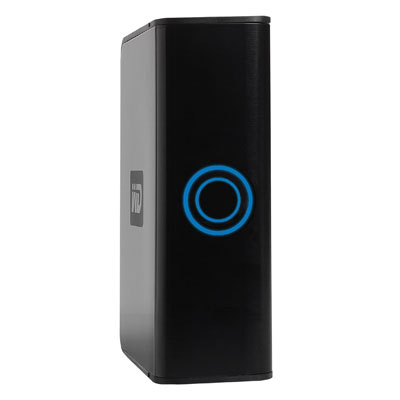
This week I received my new external harddrive, a 500GB Western Digital My Book as an upgrade from my 320GB Western Digital external which was full. I use the harddrive as both a full backup of my MacBook Pro’s hard drive and as storage for my software, videos, and downloads.

mybookdesk.jpg

The drive is dual-interface, meaning it has both firewire and USB inputs, and its enclosed in a black, brushed metal casing. Although I purchased this drive because of the size upgrade, now that its sitting on my desk I realize that the drive’s appearance is more that just good looks. As you can see from the picture above, the drive is modeled after a book (the top vents are even meant to look like pages). The advantage here is that the drive looks quite natural on my desk (or on a shelf even), as opposed to my previous drive which stuck out significantly.

As I look at this new drive, I realize that I have 150 Gigabytes left on it once I copied all of my files from my old drive over. Although this may seem like a lot of space, 320GB seemed like way more than I would ever need when I purchased my

old drive. The advantage to this new drive is that I could have multiple drives like this My Book on my shelf, and it would merely look like a collection of books. If anyone is looking for an external harddrive, I highly recommend the WD My Book line.


The Best of Both Worlds

Tuesday, June 13th, 2006
parallels1.jpg

As I’m sure some of you have noticed, I have completely switched over to Mac OSX from Windows. And, I have done so, without the slightest regret, concern, or second thought. I will not go into why the word superior does not do justice to OSX over windows, but if any of you have doubts, I assure you that that is the case (and if you are still unclear, I’ll gladly explain at a later time).

However, due to the fact that I am an engineer, and the majority of engineering applications that I work with are not compatible with OSX, my transition cannot be 100% complete. Though I hope that one day AutoDesk will reconsider releasing a version of AutoCAD for OSX, in the present day there is little that comes close.

It is therefore that I am forced to use Windows, and, with Apple’s release of Boot Camp, I can now dual boot both OSX and Windows XP (and Vista for that matter). I have tried this solution and though it is quite seamless and is an amazing development in the world of Apple, restarting each time that I need to use a Windows application is a tedious task to repeat over and over throughout the day (I refuse to use Windows for any longer than I have to when given the alternative to use OSX).

Well to the rescue comes a Parallels Desktop for Mac, “an easy to use virtual machine which allows users to run Windows and other OSes in virtual containers directly on Mac OS X desktop. Use Windows applications without losing the functionality of your Mac - no rebooting required.” Parallels Desktop allows me to run Windows at almost full speed within a window in OSX, Parallels Desktop for Macminimizing it (or putting it in standby) when I don’t need it, and instantly turning it back on when I do. The program is not currently released as a retail product, but is very quickly nearing a release. For now, you can download the program and use it for free for 30 days (or until they release the final version for $40). I highly recommend this program for anyone who is forced to use Windows. For those of you who are not, get a mac.


Those have to be extensions!

Monday, June 12th, 2006
extensions.png

I was going to get right into this post, but I realized that I should step back and let anyone who doesn’t know, find out. If you are still using Internet Explorer, and you care about your security, sanctity, and sanity, please download Mozilla Firefox and never use IE again. Firefox has unparalleled advantages over IE, including tabbed browsing, enhanced security, and extensions.

It is these extensions (or plugins) that really separate Firefox from any browser, including Safari. The two extensions that I personally cannot live without are Tabbrowser Preferences and AdBlock.

I use Tabbrowser Preferences in order to force all of my new browser windows to open in tabs as opposed to new windows, significantly speeding up browsing and allowing people who like tons of different pages open at the same time to organize their browsing in one simple window.

While Tabbrowser Preferences is a very helpful browser add-on, AdBlock on the other hand should be a requirement for anyone who visits any webpage. AdBlock is a content filter that allows you to block any kinds of images or inline frames both directly, and using wildcards. Furthermore, AdBlock allows the importing of other people’s AdBlock databases, which spares you the work of having to manually block ads yourself. For everyone’s convenience, I have attached my well refined and time tested adblock list, and encourage all of you to download it, and import it once you download AdBlock.

To import a list into AdBlock, install the AdBlock extension, download my AdBlock Filter File, restart Firefox, go to Tools–>AdBlock–>Preferences and in the Preferences window go to AdBlock Options–>Import Filters. Point adblock to the Adblock Filter File you downloaded and you are all set.

Let me know if you have problems with either of these extensions, and I’ll gladly help you out. If you are interested in finding more useful Firefox extensions, check out Cnet’s three part article on the Best Firefox Extensions.


Music To My Speakers

Sunday, June 11th, 2006

Though my music collection these days can neither be described as large nor small, I often find myself with a slight fear of musical stagnation - in fear of the day that I stop looking, liking, and exploring new music and grow too comfortable with the music I already have.So, being the unyielding believer in the advancement of modern technology that I am, I faithfully set out on a mission to find new sources of music that I would like, using a system hopefully a bit more advanced than using Amazon’s “Customers who bought this item also bought” system (though this system is surprisingly accurate and helpful most of the time). In my search, I stumbled upon three sources of information that have not only helped to expand my iTunes library significantly, but also have served to assuage my fear each time it arises.

My first such source is also the most rudimentary one, and though I berated Amazon.com above, the site actually is quite helpful in this regard. There is no substitute for user opinions, and it is Amazon’s customer reviews of albums I already have that I use in order to find similar artists. While reading through the vast amounts of album reviews, I run into people comparing the artist to others and accusing the artist of copying the style or genre of someone else. And from there I take those other artists, and see if I like them or not. Quite rudimentary I know and thus my second source.Throughout my music collection, and only in the last three years, I have many non-mainstream artists that seem to not get the attention they deserve (such is life). But despite not getting their much deserved recognition, it seems that finding them proves difficult as well.

Emusic

Fortunately, for ind(i)ependent artists and independent record labels, emusic.com serves as a collaborative site that catalogues millions of artists and allows song downloads at relatively cheap prices ($0.25 each with a subscription model) without any DRM (digital rights management) included. Personally I have not purchased any music from them, but the articles, recommendations, and polls help to serve as a guiding light for emerging independent artists. If you have not check this site out I highly recommend it.

The third and final source of new artists (to me) is called Pandora. Pandora is the child of the Music Genome Project, a project who’s aim was to “capture the essence of music at the most fundamental level” by “assembling literally hundreds of musical attributes or “genes” into a very large Music Genome. Taken together these genes capture the unique and magical musical identity of a song - everything from melody, harmony and rhythm, to instrumentation, orchestration, arrangement, lyrics, and of course the rich world of singing and vocal harmony.”

The Music Genome Project is a pretty amazing achievement on its own. However, Pandora utilizes the genome project’s findings in order to, once you enter songs or artists that you like, offer you song suggestions not only with text, but also in a radio station type form. This allows you to hear the recommendations and let the station know if you liked the song or not, and Pandora based on your preferences, will tailor the station programming to your liking. The technology behind Pandora amazes me to this day, and the simplicity of use is unparalleled (each recommended song includes purchase links to the iTunes store and Amazon.com (in case you want to hear the song again and make it yours). Below is a screenshot of Pandora’s user interface. Enjoy!

Pandora UI

I wish you all the best in your search for new music, and hopefully your will find these three sources helpful along the way :)


iCons Aplenty

Saturday, June 10th, 2006

What a long, findless day its been. I like to think that everyday I find something new and exciting to post about, but today seems to be an exception. However, rather than leave you empty handed, I have a number of topics that I have been saving for days like this.

Icons

As I look back on my computer ownership over the years, one of the things I have come to enjoy is the customization of the look and feel of my computers. Anything from visual styles (windows XP), to desktop backgrounds and icons. However, most of this desire to customize has been left in the dust with my complete and utter conversion to Apple Computers. While most would argue that the visual flexibilty of OSX is equal if not superior to that of Microsoft Windows, I find myself competely comfortable and content with OSX just as it is: Aqua.jpg for the background and Aqua for the visual styles.

However, the one exception are the icons in OSX. Though most of them are brilliant and beautiful, I do long to change some, and when I do, I wish to replace them with Aqua quality icons that fit just right. Though many icon sites exist, the largest (and best) collection of icons that I have found has been at InterfaceLift. This site includes icons, desktop backgrounds, and visual styles for both Windows and OSX, and the interface (no pun intended) is quite easy to use. If your interested in making your machine your own, WindowsXP or OSX, I’d highly recommend you check it out :)


A Backup for All Flavors

Friday, June 9th, 2006
superduper.png

Today I took up the longstanding task of finding Windows compatible Backup Software similar to SuperDuper! for OSX.

For those of you who have never used SuperDuper!, let me take this chance to proclaim it the one piece of backup software you will ever need. As far as my needs, SuperDuper allows me to create a bootable copy of my MacBook Pro’s harddrive on my 320GB external harddrive Westie, named for its Western Digital creators. On top of this amazing feature, SuperDuper has the option of either each time doing a complete backup (erase external drive partition and copy the MacBook’s harddrive), or what T-Shirt Software calls a SmartBackup (using the existing backup to only modify and add the files that have changed since the last backup). With the SmartBackup feature, I can do backups in literally fractions (very small fractions, in fact) of the time. All of these features are compounded by an amazingly user-friendly interface, and a low price of $30. To put it simply, this software is a must have if you worry about data loss (which you should).

“If this piece of software is so great, why are you looking for a Windows version?” you might ask. I’m on this mission for my father, who needs a reliable, simple, and accurate backup solution for his Windows XP box. So in my search, I have run across two solutions and it is them that I present to you today:

The first solution was suggested to me by my Guru-of-all-things-tech Jon, and is called Cobian Backup 8. Cobian Backup 8 is still in beta, and does offer a bootable backup solution. According to the website, the program ” is a multi-threaded program that can be used to schedule and backup your files and directories from their original location to other directories/drives in the same computer or other computer in your network. FTP backup is also supported in both directions (download and upload).” Though it is free, the program unfortunately seems to still be in development, and offers a bit less intuitive and user-friendly approach than the next program, Casper XP.

CasperXP

Casper XP was the other backup software I discovered in my search, and it seems to most closely resemble what I need. The program seems like the Windows equivalent of SuperDuper!, and though the price is higher, it does offer its own version of SmartBackups, which they call SmartClone technology. Though I have yet to use the program, it does seem promising. The first sentence on the website ends this great search of mine: ” Casper XPâ„¢ makes it a snap to keep a bootable backup of your Windows XP system. Just use Casper XP to copy your system hard disk to another hard disk. When your system hard disk fails or becomes corrupted, simply boot your computer directly from your backup hard disk and you’re up and running again in just seconds! It really is that easy!”

I’ll post an updated review of the program once I purchase my new MyBook 500GB External Drive and give Westie to my dad.


My Worlds are Colliding

Thursday, June 8th, 2006
trendspotting1.jpg

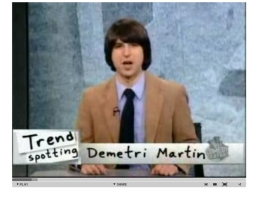
After a long day at the courthouse (ya that’s right, I have jury duty and am loving it to say the least), nothing puts a smile on my face like two of my interests coming together. I’m referring of course to the news today that Demetri Martin, of Daily Show Trendspotting fame, has apparently signed with Microsoft to be a spokesman for the release of Microsoft Vista, if and when the consumer market ever sees it.

Its an interesting move for the computer mogul, especially in light of Daily Show Veteran John Hodgman playing the dull Windows PC in Apple’s Get a Mac advertising campaign.

If any of you haven’t seen Demetri Martin’s trendspotting campaign, I highly recommend you take a look. My favorite still has to be the life coach one so be sure and check it out.

On a seemingly related but mostly not note: who the hell does surveys that put the iPod against Beer?